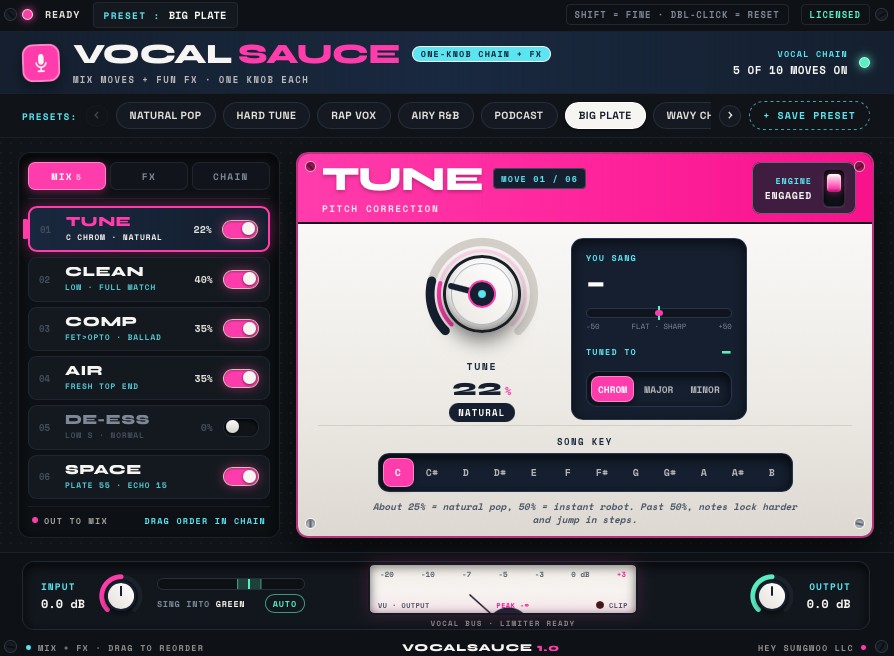
Every control in VocalSauce, in the order you'd use it. Tap a section in the menu to jump straight to it.
01
Get your level right
Every move is tuned for one input level, so set this first.
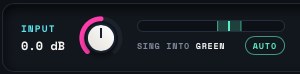
- INPUT
- Turns your vocal up or down before anything else, ±24 dB.
- Sweet spot meter
- Sing and aim the bar at the green line. It tells you LOW · TURN UP, HOT · TURN DOWN or SWEET SPOT.
- AUTO
- Click it and sing or play the vocal. It listens for 4 seconds and sets INPUT for you.
02
Presets
10 starting points. They never change your song key, voice settings or input level.

- Preset strip
- Click a preset to load it. Use ‹ › or scroll to see the rest.
- + Save preset
- Name your own sound and keep it, up to 24. Your chain order is saved with it.
- ×
- Deletes one of your own presets. Click it twice.
- Natural Popgentle tune, plate reverb
- Hard Tunehard tune with echo
- Rap Voxlight tune, fast de-ess, small room
- Airy R&Bextra air, plate and quarter-note echo
- Podcastno tune, no reverb, just clean and clear
- Big Platea big plate reverb
- Wavy Choruschorus with a brighter voice
- Dark Octaveoctave down, deeper voice, double
- Radio Hookradio grit
- Fuzz Ragefuzz grit and flanger
03
Finding your way
The left rack lists your moves. Click one to open it on the big panel.
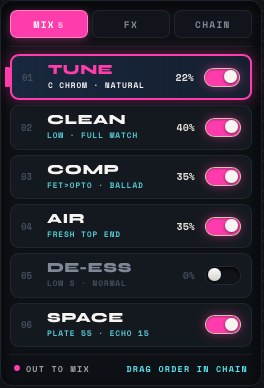
- MIX / FX / CHAIN
- MIX holds the 6 mix moves, FX the 4 hook effects, CHAIN the order they run in. The number on a tab = moves switched on.
- Move rows
- Each row shows the move's settings and amount at a glance.
- On / off switch
- Turns a move on or off without losing its settings. Switching never clicks.
- ENGINE
- The lever on the big panel does the same for the move you're looking at. Touching a knob also turns its move on.
- Knob words
- Under each knob a word tells you how far you've gone, like Natural, Robot or Shimmer.
04
Tune
Pitch correction. Pick your key, then turn one knob.
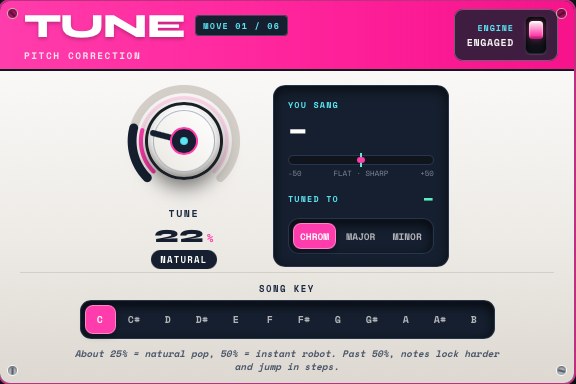
- Tune
- How hard notes get pulled in. About 25% sounds natural, 50% is the instant robot. Past 50%, notes lock harder and jump in steps.
- Song key
- Your song's key, C to B.
- Chrom / Major / Minor
- CHROM tunes to any note. MAJOR or MINOR only to notes in your key.
- You sang / Tuned to
- Shows the note you sang, how many cents flat or sharp, and the note it was tuned to.
05
Clean
A smart EQ that learns your voice and pulls it toward a pro vocal tone.

- Clean
- How far it pulls your tone. Fixes boomy or dull mics.
- Voice
- LOW or HIGH. Most men sound best on Low, most women on High.
- Gap noise
- AUTO quietly lowers hiss and hum between your lines. On by default.
- Smart EQ
- A live picture of what Clean is doing, from low to air.
06
Comp
Keeps your vocal steady and upfront. The level stays matched as you turn it.

- Comp
- How much it evens out your vocal, from Light to Squashed.
- Model
- FET is fast and punchy and grabs peaks. Opto is smooth and warm. Both runs FET > Opto, the classic chain, and is the default.
- Style
- Rap, R&B, Rock or Ballad sets how fast it grabs and lets go.
- Gain reduction
- Shows how much it's turning your vocal down, in dB.
07
Air & De-Ess
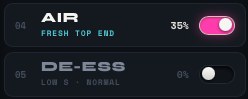
Sparkle on top, without the harsh esses.
- Air
- A steady lift on the top end, from Breathy to Shimmer. No pumping.
- De-Ess
- Tames harsh S sounds and leaves your vowels alone. It comes after Air, so it catches any esses Air brings up.
- Esses
- LOW (5–7k) or HIGH (7–9k), where your esses sit.
- Speed
- SMOOTH is the gentlest, NORMAL the all-rounder (start here), FAST grabs quick, clicky S, T and CH sounds.
- S reduction
- Shows how much the esses are being turned down.
08
Space
Reverb and echo that stay out of your way.

- Verb
- How much reverb, from Dry to Huge. It ducks while you sing, so your words stay clear.
- Verb type
- ROOM or PLATE. The pre-delay locks to your song's tempo by itself.
- Echo
- How much echo, synced to your song. Use it with or without the reverb.
- Echo time
- 1/8, dotted 1/8 or 1/4.
- Grid
- Use ½× or 2× if your beat was made at half or double tempo. 1× for everything else.
09
Hook effects
Open the FX tab. One knob each.
- Formant
- Changes the size of the voice, not the notes. Left = deeper, bigger throat, right = smaller and brighter, up to 8 semitones. Double-click = natural.
- Octave
- Blends in a copy of your voice an octave DOWN (dark under-layer) or UP (thin, airy top). It follows Tune and Formant.
- Chorus
- CHORUS is a dreamy wobble, DOUBLE a fake double-track, FLANGER a jet sweep, one per bar.
- Grit
- TAPE is warm, FUZZ crunchy and aggressive, RADIO a telephone or AM radio sound. Level stays matched.
10
FX bus & chain order
Balance your effects against your lead, and choose the order the moves run in.

- VOCAL
- Your lead vocal level, from off to 0 dB.
- FX
- The level of the octave layer and chorus voices, from off to 0 dB.
- FX EQ
- Thins out the effects so your lead stays in front. Higher = thinner, more separated effects.
- SOLO FX
- Hear only the effects. Click again to bring your vocal back.
- CHAIN
- Drag the ≡ handle to reorder the moves. Tune, Formant and Octave always stay first.
- RESET ORDER
- Back to the default order: Clean, Comp, Grit, Air, De-Ess, Chorus, Space.
11
Output & meters
A finished level, with a safety net.

- OUTPUT
- Your final level, ±24 dB. Push it for a louder vocal: the built-in limiter catches the peaks.
- VU meter
- Shows your output level, with the loudest peak underneath.
- CLIP
- Lights up red if your output hits the top.
- Limiter
- Always on. The caption under the meter shows how hard it's working.
Specs
- Formats
- Mac AU + VST3 · Windows VST3
- Systems
- Apple Silicon + Intel · Windows 10/11
- Works in
- Logic, GarageBand, Ableton, FL Studio + more · on your vocal track
- License
- One-time · 3 computers · works offline
- Updates
- Free
- Guarantee
- 30 days money back