1
Chords or Chops
Pick what you drop in.
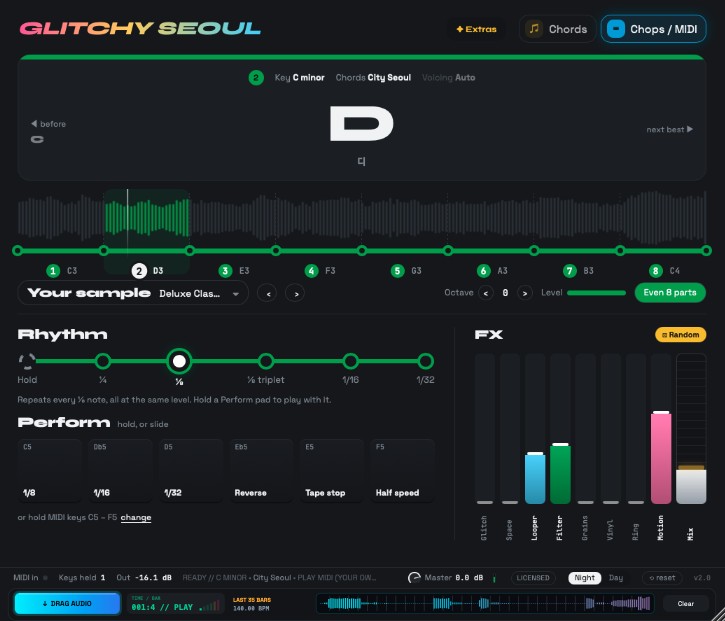
- Chords one sound: every key plays a full chord from it
- Chops / MIDI a loop: cut into 8 parts across C3 to C4
- Your sample built-in sounds, or drop in your own
2
Your chords
The big sign shows what you are playing.
- Key your song key, major or minor
- Chords the chord set, from City Seoul or a free chord pack
- Next best ideas for the chord to play next
3
The sample
Your sound, cut into parts.
- 8 parts one per white key, C3 to C4
- Even 8 parts cut it evenly, or drag the edges
- Octave & Level pitch it up or down, set its volume
4
Rhythm & Perform
How it repeats, and what you play live.
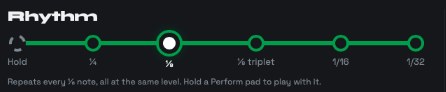
- Rhythm hold, 1/4, 1/8, 1/8 triplet, 1/16, 1/32
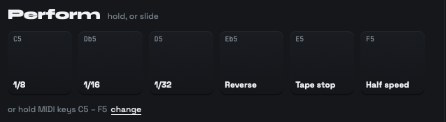
- Perform hold a pad for repeats, reverse, tape stop or half speed
- MIDI or play the pads from keys C5 to F5
5
The FX desk
Eight faders and one Mix.
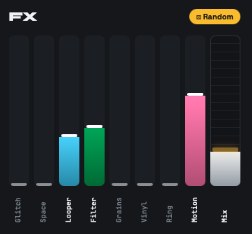
- Faders Glitch, Space, Looper, Filter, Grains, Vinyl, Ring, Motion
- Mix how much of the effects you hear
- Random rolls new effects and keeps your sample
Specs
- FormatsMac AU + VST3 · Windows VST3
- SystemsApple Silicon + Intel · Windows 10/11
- Works inLogic, GarageBand, Ableton, FL Studio + more
- LicenseOne-time · 3 computers · works offline
- UpdatesFree
- Guarantee30 days money back
$69
One-time · Mac + Windows · 30-day money-back guarantee
Get Glitchy Seoul → Or get all 11 tools in the Plugin Bundle for $99