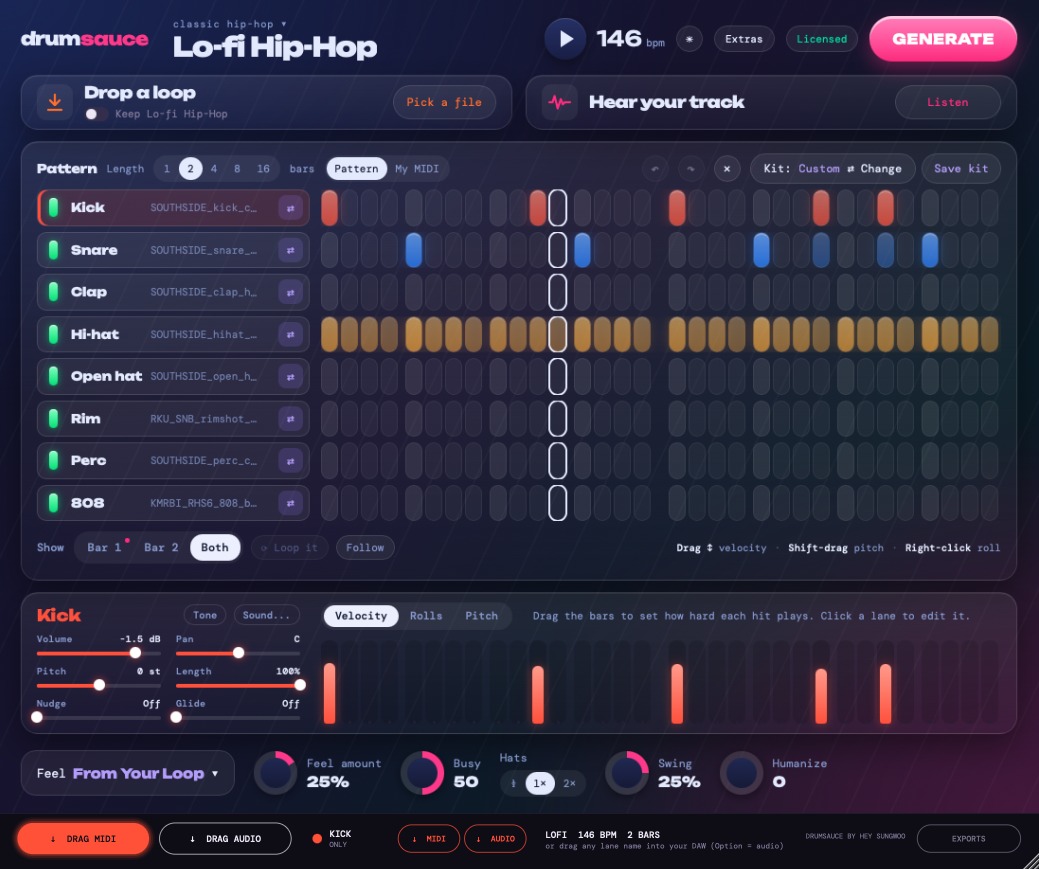
Every control in DrumSauce, in the order you'd use it. Tap a section in the menu to jump straight to it.
01
Pick a genre
Start here. The genre decides the drums and the groove you get.

- Genre
- Click the genre name at the top to open the list: 109 genres in 13 families, each with a short description.
- Search
- Type any style, like drill, amapiano, jersey or phonk, and it finds it.
- NICHE
- 55 genres are marked NICHE: smaller scenes and regional styles.
- Trap & Raptrap, hood trap, rage, plugg, pluggnB, jerk, cloud rap
- DrillChicago, UK, NY, sample, Jersey and afro drill
- Phonk & MemphisMemphis rap, phonk, drift, Brazilian and house phonk
- Classic Hip-Hopboom bap, lo-fi, jazz rap, G-funk, 90s East Coast
- Club & Regional RapJersey, Baltimore and Philly club, bounce, Miami bass, hyphy
- R&B & SoulR&B, trap R&B, 90s R&B, new jack swing, neo-soul
- Pop & Altpop, hyperpop, digicore, bedroom pop, synthwave, disco, K-pop
- Latin & Caribbeanreggaeton, dembow, dancehall, soca, baile funk, cumbia
- Africanafrobeats, amapiano, afro house, gqom, kuduro, alté
- UK & BassUK garage, grime, UK funky, bassline, dubstep, riddim
- Drum & BassDnB, liquid, jump-up, neurofunk, jungle, footwork
- House & Technohouse, deep house, tech house, ghettotech, techno
- EDMtrance, psytrance, hardstyle, big room, future bass
02
Generate & play
Make a pattern and hear it.

- ▶ Play
- Previews the pattern when your DAW is stopped. While your DAW plays, DrumSauce follows it.
- BPM
- Shows your project tempo.
- ☀ / ☾
- Switches between night and day colours.
- GENERATE
- Writes a new full pattern in your genre every time you press it.
03
Fit it to your loop
Two ways in, side by side.

- Drop a loop
- Drop a loop or sample on the card, or click Pick a file. DrumSauce reads its tempo, swing and accents and writes drums that sit in the pocket.
- Keep genre
- On: it keeps the genre you picked while it fits. Off: it picks the genre that suits the loop.
- Hear your track
- Solo your loop in your DAW, press Listen, then press play. It fits as soon as it has heard it.
04
Pattern & kit
Length, undo and the kit, along the top of the grid.

- Length
- 1, 2, 4, 8 or 16 bars.
- ↶ ↷
- Undo and redo.
- ×
- Clears the pattern.
- Kit
- Change swaps the whole kit. Save kit keeps your current sounds as your own kit.
05
The lanes
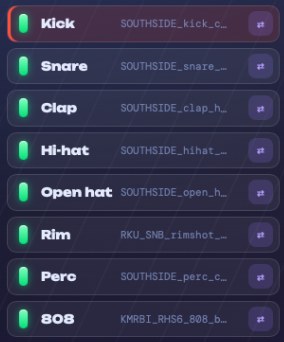
Eight lanes, each with its own sound. The 808 is back.
- Name
- Kick, snare, clap, hi-hat, open hat, rim, perc and 808. The green light turns a lane on or off.
- Sound
- The sample on that lane.
- ⇄
- Swap the sound, or drop your own WAV on the lane.
06
The grid
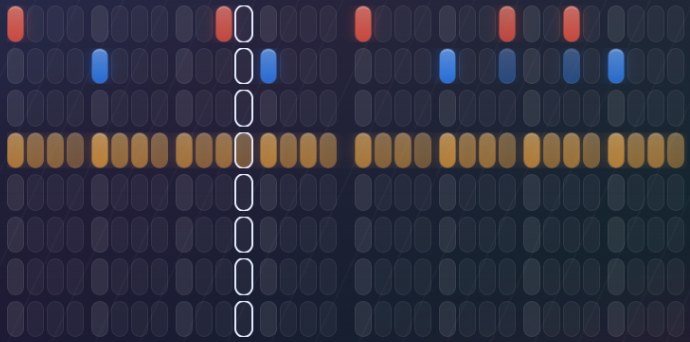
Click, drag and right-click right on the steps.
- Click
- Turns a hit on or off.
- Drag up / down
- Louder or quieter. The fill height shows how hard it hits.
- Shift-drag
- Changes the pitch of that hit.
- Right-click
- Adds a roll: 1/2/3/4/6/8, triplets included. Rolls show as ×2, ×3…
07
Show bars
Long patterns, one or two bars at a time.

- Bar 1 / Bar 2 / Both
- Which bars you see on the grid.
- Loop it
- Plays only the bars on screen, over and over, while you work on them.
- Follow
- On: the screen turns the page with the playhead.
- Drag / Shift-drag / Right-click
- Velocity, pitch and rolls, right on the grid.
08
Lane editor
Click a lane name and its settings open here.

- Volume, Pan
- Level and left/right for that drum.
- Pitch, Length
- Tune it up or down, and how long each hit rings.
- Nudge
- Push the whole lane a little early or late.
- Glide
- Overlapping notes slide into each other. Made for 808s.
- Tone, Sound...
- Shape the tone, or swap the sample.
- Velocity / Rolls / Pitch
- Draw each one as bars, one per step.
09
Feel & groove
The bottom row sets how it grooves.

- Feel
- 15 feels, from Straight and Laid Back to Drunk, Boom Bap Pocket and Afro Swing, or From Your Loop.
- Feel amount
- How strong the feel is.
- Busy
- How many kicks, snares, claps and percs.
- Hats
- Half-time, as made, or double-time hats.
- Swing
- 0–100%.
- Humanize
- Small random timing and velocity changes so it sounds played.
10
Drag it into your beat
The strip along the bottom.

- Drag MIDI
- The whole pattern as MIDI, 808 included.
- Drag audio
- One seamless audio loop at your tempo.
- MIDI / AUDIO
- Just the lane you have selected.
- Exports
- Save the files to a folder.
Specs
- Formats
- Mac AU + VST3 · Windows VST3
- Systems
- Apple Silicon + Intel · Windows 10/11
- Works in
- Logic, GarageBand, Ableton, FL Studio + more
- License
- One-time · 3 computers · works offline
- Updates
- Free
- Guarantee
- 30 days money back