Every control in City Seoul, in the order you'd use it. Tap a section in the menu to jump straight to it.
01
Your sound
Pick what your chords are played with. Only the sound changes; your chord settings stay.
Sound menu
101 built-in sounds, grouped by type: keys, pads, plucks, bells, vox, brass, leads, synths, wind and FX. Use ‹ › to step through them.
Load sound
Click LOAD SOUND or drop any one-shot on the plugin: a note, a vocal, a synth, a flute. WAV, AIFF or MP3.
Sound root
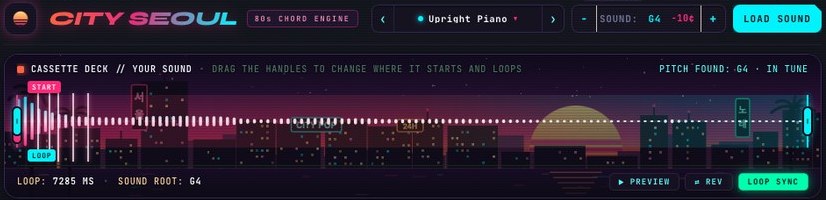
The note your sound plays at its original pitch. City Seoul finds it for you (PITCH FOUND). Use − / + if a sound is slightly out of tune (±50 cents).
Start & loop
Drag the START flag to choose where the sound begins, and the LOOP flags to choose which part repeats while you hold a chord.
Preview
Hold to hear your sound on its own, at its own pitch, with your start, loop and reverse.
Rev
Plays the sound backwards. Great for swelling, dreamy chords.
Loop sync
Every note's loop snaps to your song's tempo, so long chords pulse in time. On by default.
02
Key, scale & octave
Set these once for your song. After that, every key you press is a chord that fits.
Key
Your song's key, C to B.
Major / Minor
City pop sounds in major, neo soul in minor. If you only change one thing, change this.
Oct
Moves every chord up or down, up to 2 octaves.
03
The chord matrix
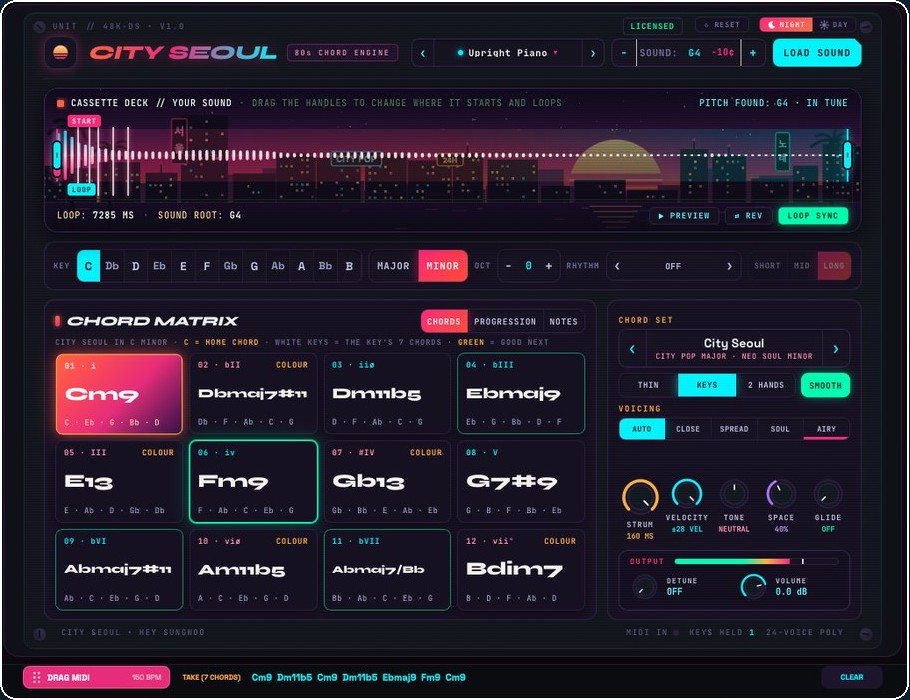
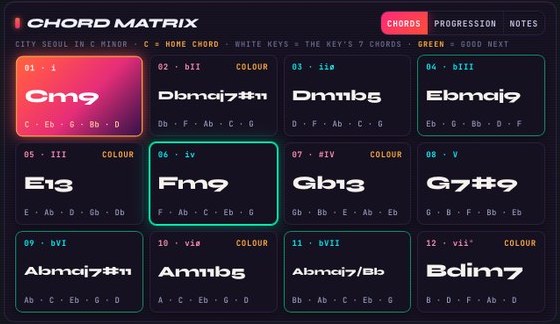
Your 12 chords, laid out like a cheat sheet. Play them from your keyboard or click the pads.
Pads 1–12
Each pad shows the chord name, its number in the key (like i, iv, bVI) and the notes inside it.
C = home chord
The C key always plays your home chord, whatever key you're in.
White keys
Play the 7 chords of your key. The pads marked COLOUR are extra colour chords from outside the key, for when you want something unexpected.
Green
After each chord, the best next chords light up green. Just follow where the green pops up.
Now playing
Shows the chord you're holding.
04
Three ways to play
Switch modes with the buttons above the pads.
Chords
Every key is a chord in your key. Play around until something feels right.
Progression
Pick one of 12 progressions with ‹ › and play it on four white keys: C, D, E, F are steps 1 to 4 (A S D F with Musical Typing). The octave you play in picks the voicing.
Notes
A plain one-note-per-key sampler. Use it to play back chord MIDI you've already dragged into your song.
05
Chord sets
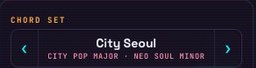
16 flavours of chords, each with its own 12 progressions. More sets are planned for free updates.
City Seoulcity pop major · neo soul minor
Tokyo Night Drivebright 80s night drive
Seoul Cafesmooth K-R&B cafe
Sunday Neo Souldeep neo soul 11ths
Late Night Keyssparse moody 7ths
Gospel Two-Handbig gospel two-hand
Lo-fi Tapedusty soft 7ths
Sunset Strumopen sus & add9 strums
Shibuya 1984slash-chord city pop
Midnight Lydianfloating lydian colours
Dark Neodark minor-major tension
Sus Soulopen sus gospel
Han River Sunsetsoft add9 sunset
Bossa Seouljazzy bossa 6/9s
Vapor Malldreamy maj13 vaporwave
Trap Soulmoody trap soul
06
Size & voicing
How big each chord is and how its notes are spread.
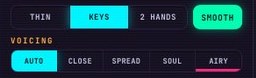
Thin
3 notes: root, 3rd and 7th. Leaves room for vocals.
Keys
5 notes, like one hand on a piano.
2 Hands
Up to 8 notes across both hands. Big and full.
Bass
Keys below C3 play just the bass root under your chords.
Smooth
Each chord moves as little as possible from the last one, like a real keys player. On by default.
Voicing
AUTO changes the voicing depending on where you play on the keyboard. Or lock it to CLOSE, SPREAD, SOUL or AIRY.
Vary
With AUTO voicing, the chance a chord comes out in a different voicing, so repeats never sound copy-pasted. Off, 25, 50 or 100%.
07
Rhythm
Hold a chord and City Seoul plays it in a pattern, locked to your song's tempo.
Patterns
Off, Stabs, Offbeats, City Pop 16ths, Pulse 8ths, Arp Up, Arp Up & Down, Slow Arp, Half Notes.
Short / Mid / Long
How long each rhythm hit rings.
08
Feel
The knobs that make it sound played, not programmed. Double-click any knob to reset it.
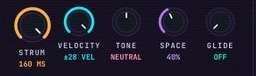
Strum
Rolls the notes of each chord like a hand on the keys, from all at once up to 160 ms. Direction: Auto (mostly up), Up, Down or Random.
Velocity
Varies how hard each note hits, like a real player. All the way down = every note the same.
Glide
Every chord scoops up into place from a few semitones below, up to 0.8 seconds.
09
Tone & output
Shape the sound without opening another plugin.
Tone
Left = warm, right = bright. Starts at neutral.
Space
Built-in reverb, from a small room to a lush hall.
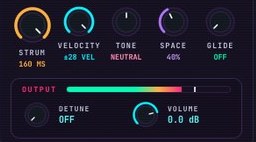
Detune
Adds a slightly sharp and a slightly flat copy underneath, like a synth's unison. Wider and chorused.
Volume
Master volume, with an output meter.
10
Drag MIDI
Found a progression you love? Keep it.
Take
City Seoul remembers your last 256 chord changes. Hitting the same chord again and again counts once (it shows as Cm9 x40).
Drag MIDI
Drag the strip onto a track in your DAW and the chords land at your song's tempo, ready to edit.
Clear
Starts a fresh take.
11
The extras
Small things that make it nicer to use.
Reset
Puts every setting back to the start. Click twice.
Night / Day
Dark neon colours, or the same colours flipped light.
Window size
Drag the corner to resize, from 70% to 150%. It remembers your size.
24-voice poly
Up to 24 notes at once, so long chords and strums never cut off.
Specs
Formats
Mac AU + VST3 · Windows VST3
Systems
Apple Silicon + Intel · Windows 10/11
Works in
Logic, GarageBand, Ableton, FL Studio + more
License
One-time · 3 computers · works offline
Updates
Free
Guarantee
30 days money back
$69
One-time · Mac + Windows · 30-day money-back guarantee